Clir Report Builder
Clir Renewables makes performance analytics software for the people who own and operate wind and solar farms. The Report Builder is how their customers turn dashboard data into the monthly and quarterly reports they send out. I redesigned it in 2021, five weeks from discovery to hand-off, while Clir was moving off a consultancy model and onto SaaS. That shift is the reason the project existed. Customers now had to do for themselves what Clir staff had always done for them.


Summary
Adoption went up after the redesign
The Report Builder had two companies using it when I started. Five weeks later it shipped, measured against targets my PM, the dev team and I had agreed before I drew anything.
- Help tickets down
- 37%
- DAU/MAU ratio up
- 12%
- Feature adoption up
- 68%
The finding I got the most out of never turned into a number. People had been using the export button as a version history, which is not what anyone at Clir thought it was for.
What I owned
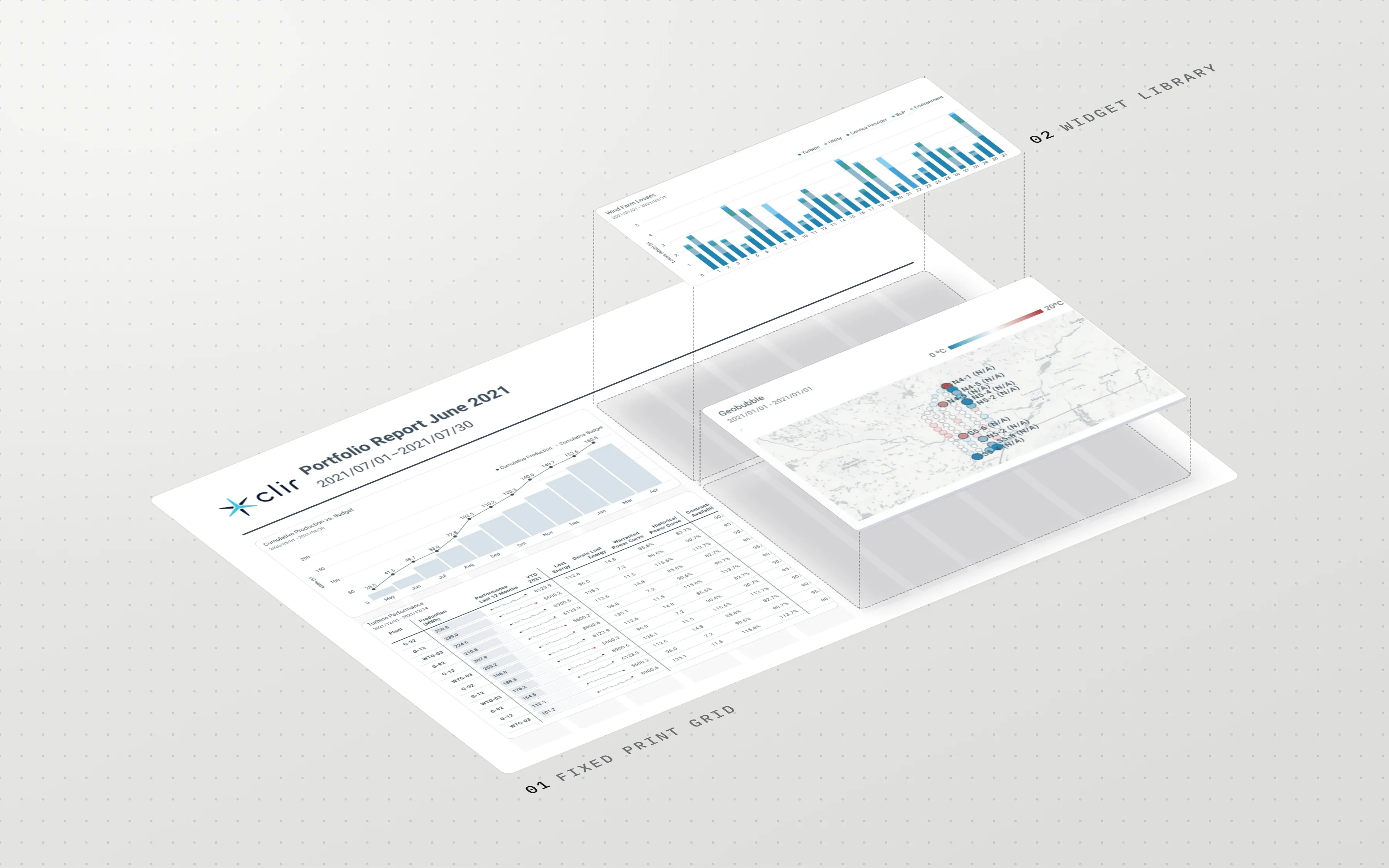
The Dashboard is where Clir's customers analyse how their wind and solar assets are performing. The Report Builder is the other half of that. You capture specific data there and prepare it as a PDF to send out each month or quarter.
I owned the Report Builder redesign. Brent, the Design Lead, was rebuilding the Dashboard over the same five weeks.
Montse and I ran interviews on top of the research my PM brought in. I drew the flows and wireframes, then worked out the grid and widget system with the other designers. Internal testing, then hand-off to engineering.
Problem
Clir was becoming a SaaS company
Clir had been a consultancy. A customer wanted a report, someone at Clir made it for them. Moving to SaaS changed who does that work. Customers had to be able to serve themselves, and the Report Builder was the tool that was supposed to let them.
Brent took the Dashboard. I took the Report Builder. We synced every week, because a customer crossing from one tool to the other shouldn't be able to tell they'd left.
A design direction called App 2.0 was being pushed across the product at the same time. It had been agreed at a high level. Nobody had worked out what it meant screen by screen, so part of my job was deciding that for the Report Builder and then being able to defend it.
There was no design system either. Nothing shared to build on, and nothing keeping the two redesigns consistent except those weekly syncs.
Two companies were using it
Two companies were actively using the Report Builder when I picked up the project. That was the whole active user base.
Clir already tracked DAU/WAU/MAU on the feature, so this was never a measurement problem. We could see perfectly well that nobody was showing up.
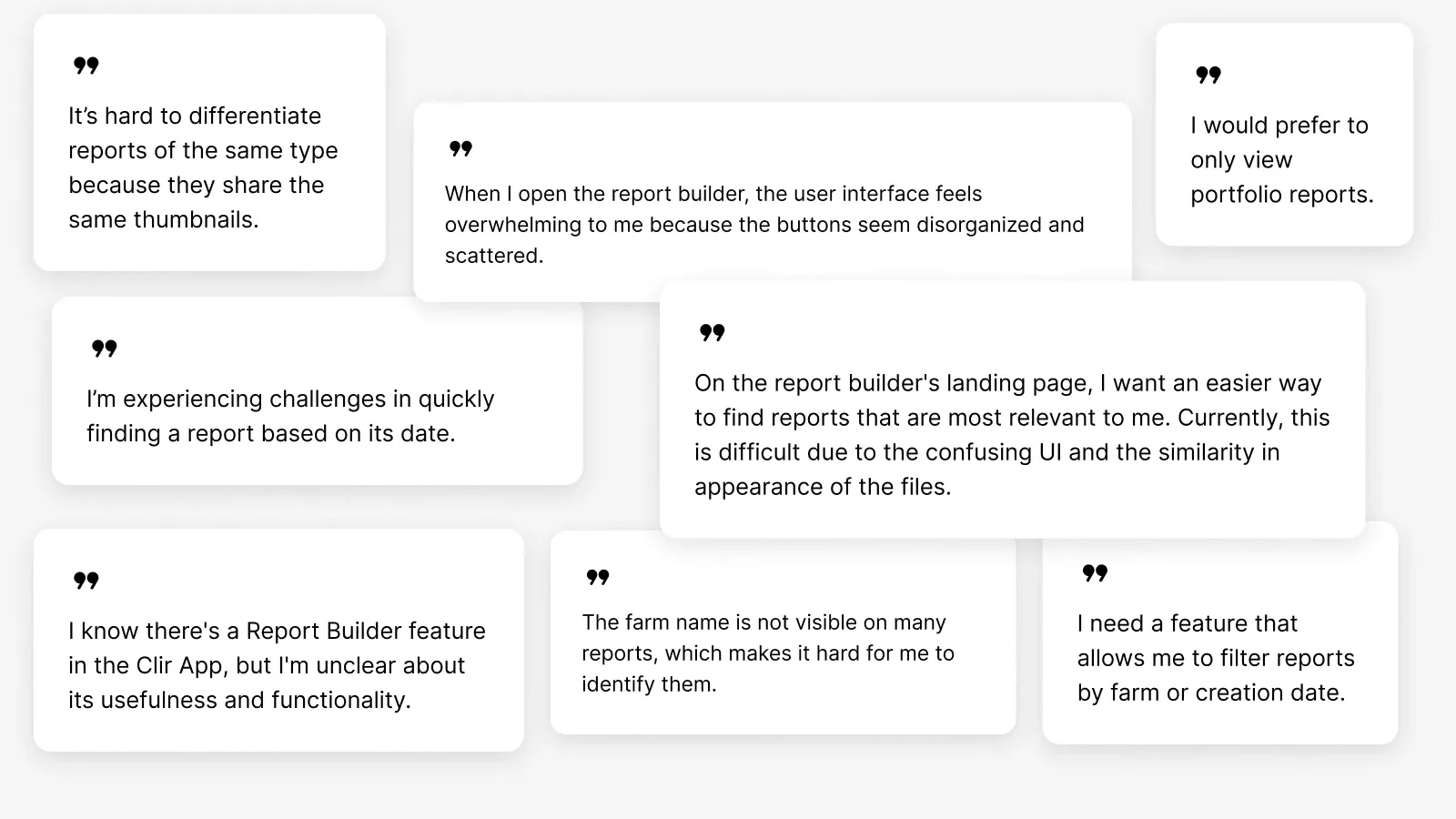
Creating a new report meant clearing four dialogs, most of them asking for decisions a user couldn't sensibly make yet. The sidebar was overloaded with text controls, and buttons sat wherever they'd been added over the years. Exporting took far more steps than it should have. Once a few reports existed, finding one was its own problem, because every thumbnail looked like every other thumbnail and there was no way to filter by farm or by date.
Most people hit all of this on their first attempt and didn't come back.
Where the reports were actually going
Low usage made it look like nobody was building reports. That wasn't what was happening. Clir's clients were still sending out monthly and quarterly reports. They were making them somewhere else.
So we went looking for where. People screenshotted the Dashboard and pasted the images into email. Others went back and redownloaded an older snapshot instead of building anything new. And a lot of the work had moved into another app entirely, one that covered a part the Report Builder didn't. That last one was the business problem. If a customer's reporting work lives somewhere else, Clir's analytics become an input into somebody else's product.
The PM and my manager came to kickoff with customer interviews and analytics already in hand, so I started with a picture rather than a blank page. Montse and I ran a few more interviews of our own on top of that. The usability testing came later and was mostly internal, run with Clir people who hadn't seen the new UI.
Export was being used as version history
The redownloading was the odd one. If someone wants last quarter's report, they already have last quarter's report. It's a PDF sitting in their inbox. Going back into a tool they disliked to pull the same file again makes no sense unless the file itself isn't the point.
The Dashboard shows current data, and current data moves. A report downloaded on the 3rd of the month is a record of what the numbers said on the 3rd. Download one in March, another in April, and you have a history. Download and Export was built to send a file to somebody. People had bent it into a way of pinning a data state they could come back to later.
Clir asked me to fix a reporting tool. What was breaking was versioning. Nobody had asked for a version history feature, because they'd already improvised one out of the closest thing available and put up with it long enough that it looked like normal behaviour.
That changed what I could do with export. Any fix that treated it purely as a way to send someone a PDF would have taken away the thing people were relying on it for. I wrote that into the design goals before I drew anything.
Four goals and five weeks
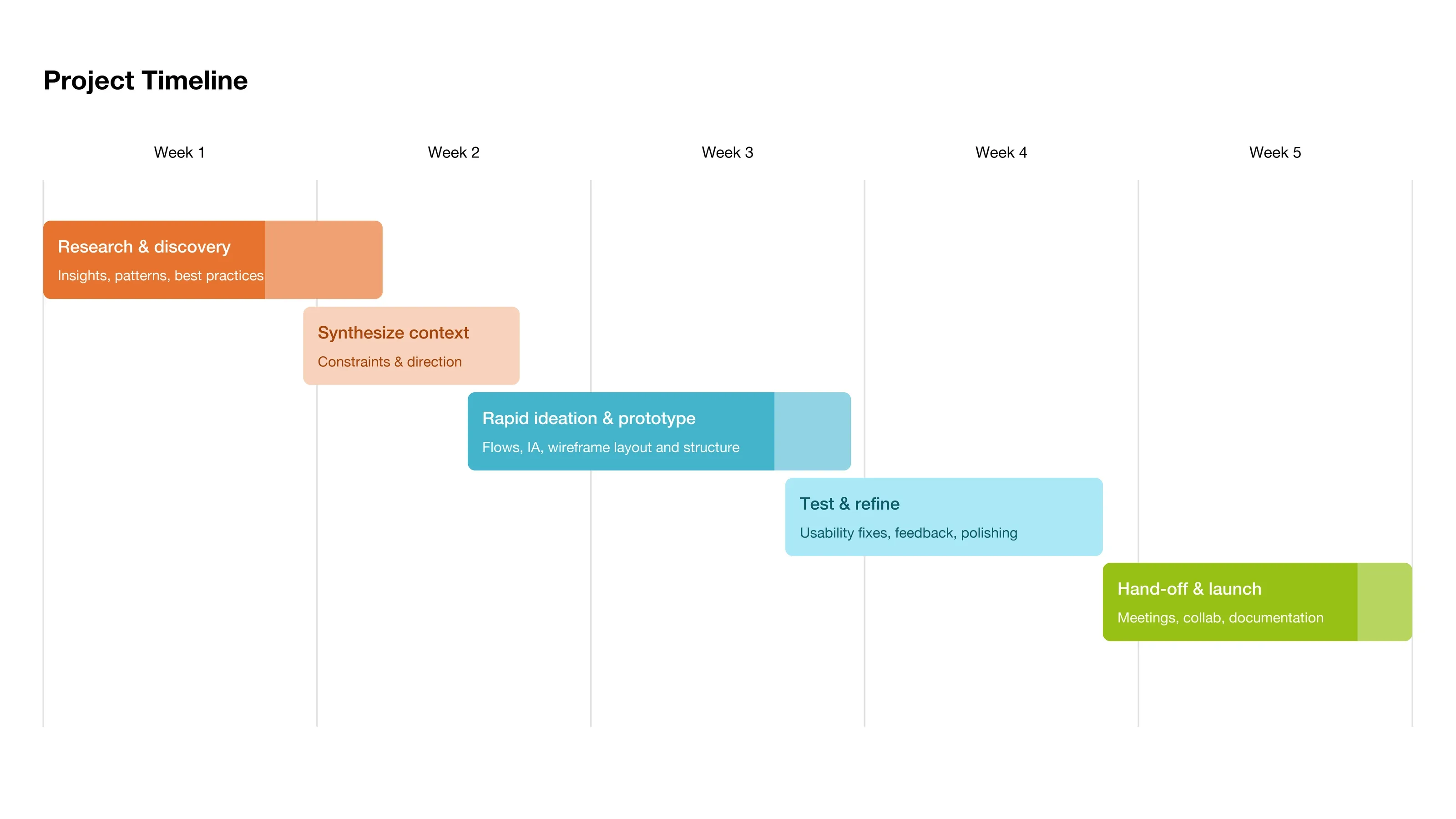
I wrote four goals down before opening Figma and checked the work against them as it went. The whole project ran five weeks, and the phases bled into each other more than the chart admits.
- Clear the usability blockers. Most of the complaints had a fix that didn't need a new feature, and those were the ones stopping people on their first attempt.
- Match the features to what people were already doing. That meant a real version history, since users had built one for themselves out of the export button.
- Make the Dashboard and the Report Builder behave like one platform. Crossing between them shouldn't cost anyone their work.
- Support self-service and automation. Under SaaS, a customer who has to ask Clir to produce a report is a customer Clir is still doing consultancy for.
Process
Four dialogs before you saw a page
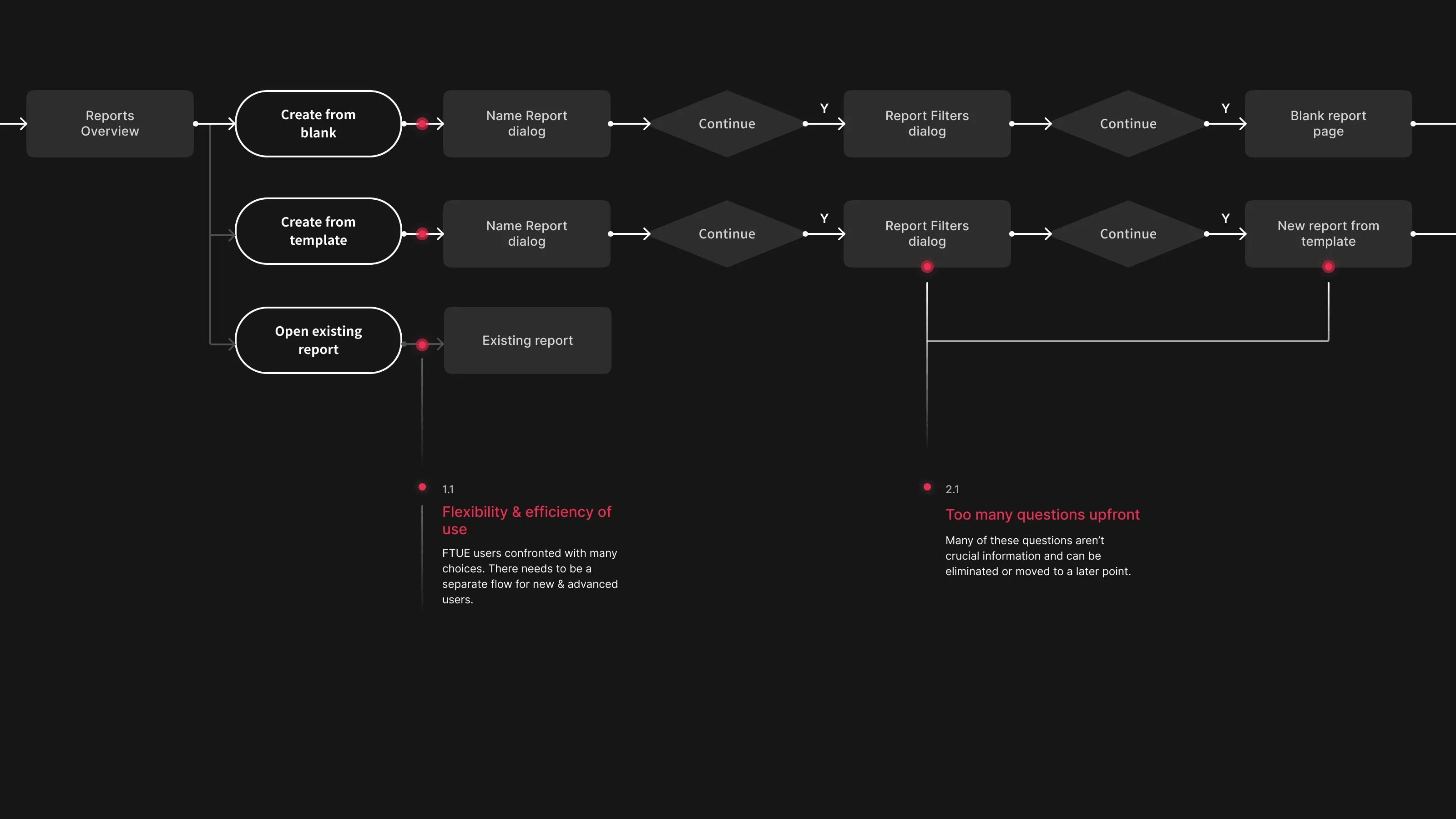
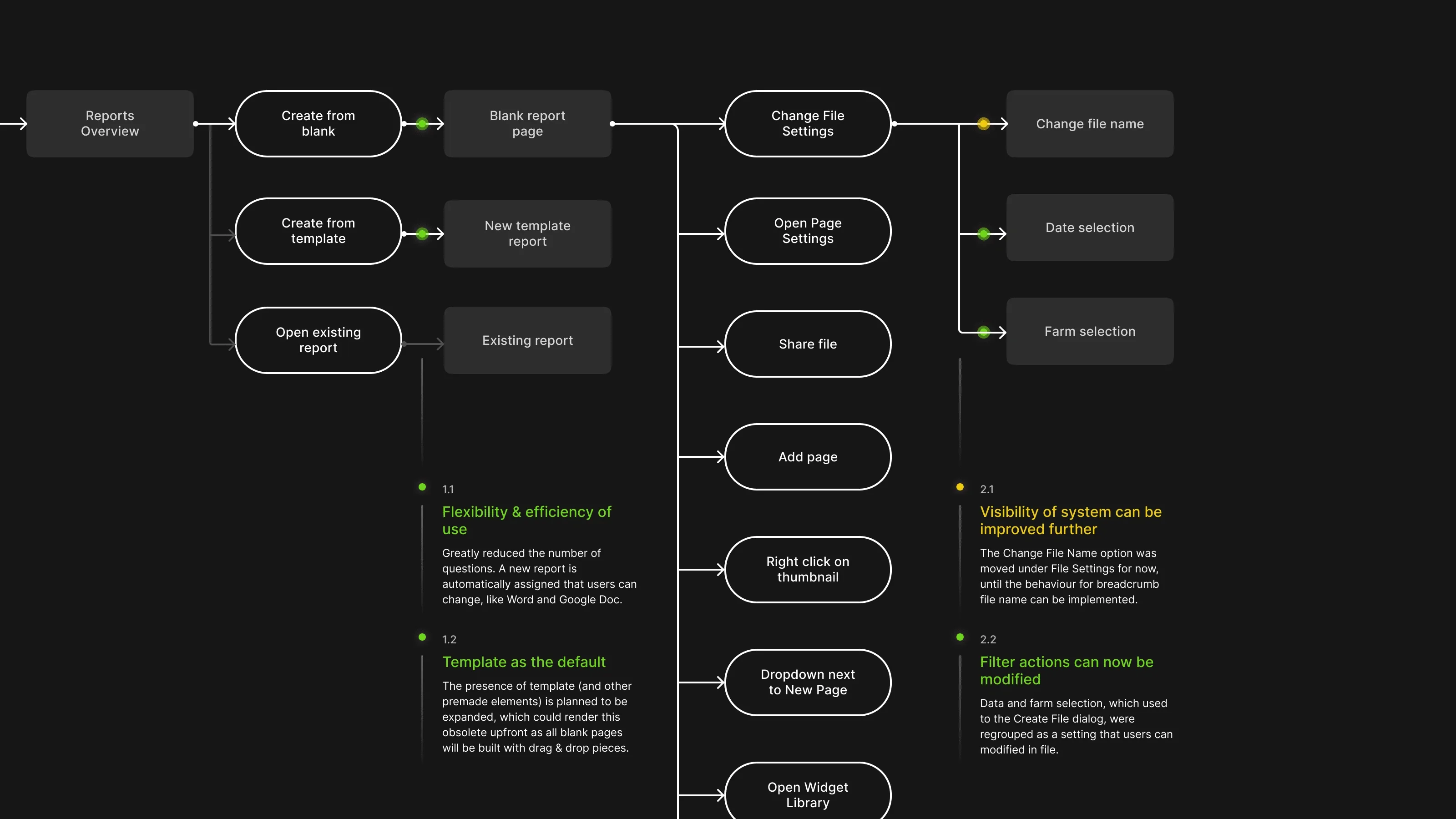
Creating a report ran through four dialogs no matter which entry point you came in from, most of them asking for decisions a user couldn't sensibly make yet. There was nothing on screen to go on. The answers all depend on what the report turns out to contain.
I cut the decision points out of the front. All three entry points now land you straight on a report page. Settings for the file, the page and the widgets branch off from there, once you've got something in front of you to change.
You work out what the report is by building it.
Start people in a furnished report
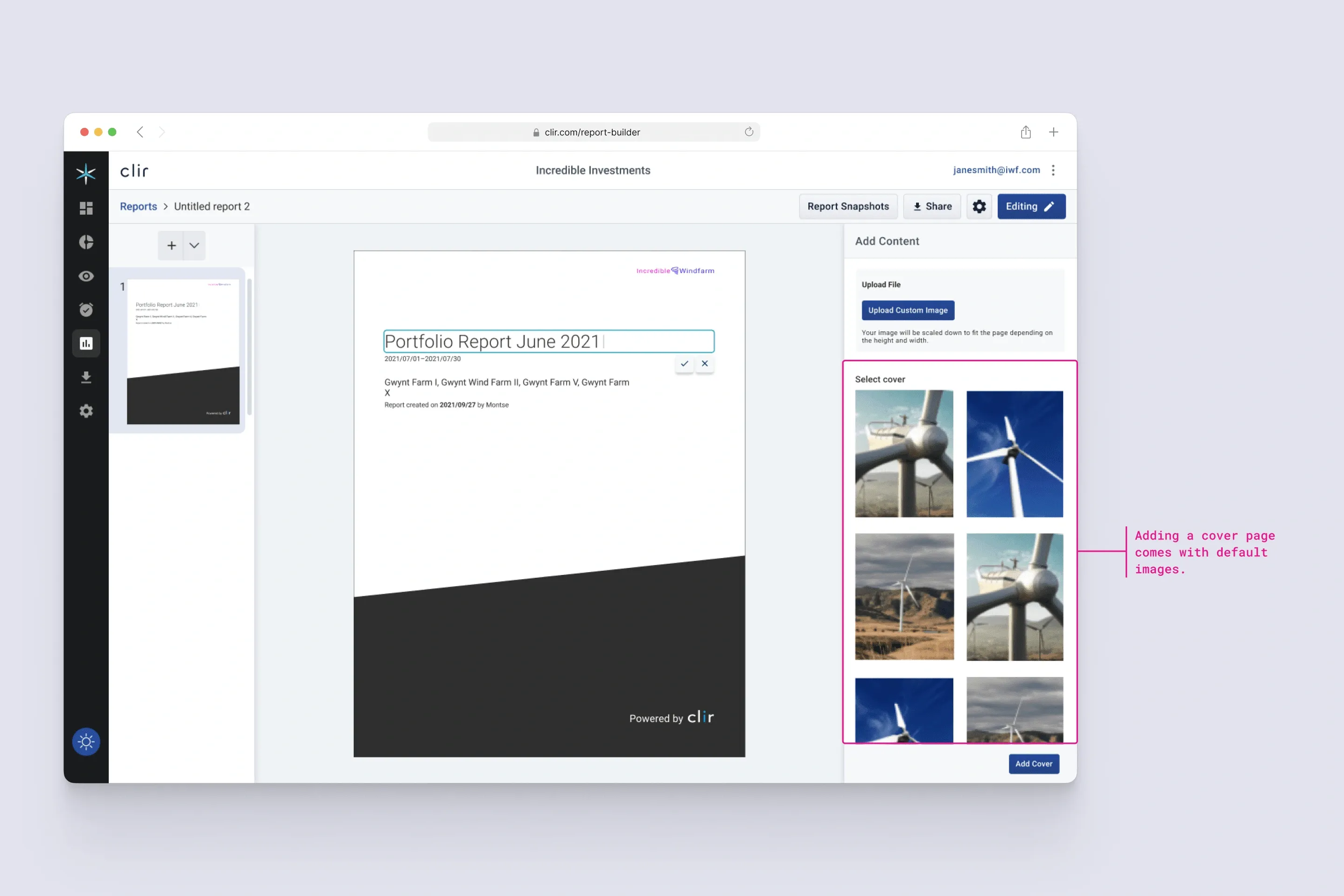
A new report opened empty. A blank canvas asks you to know what you want before you've seen what's available, which is a lot to ask of someone opening a tool for the first time.
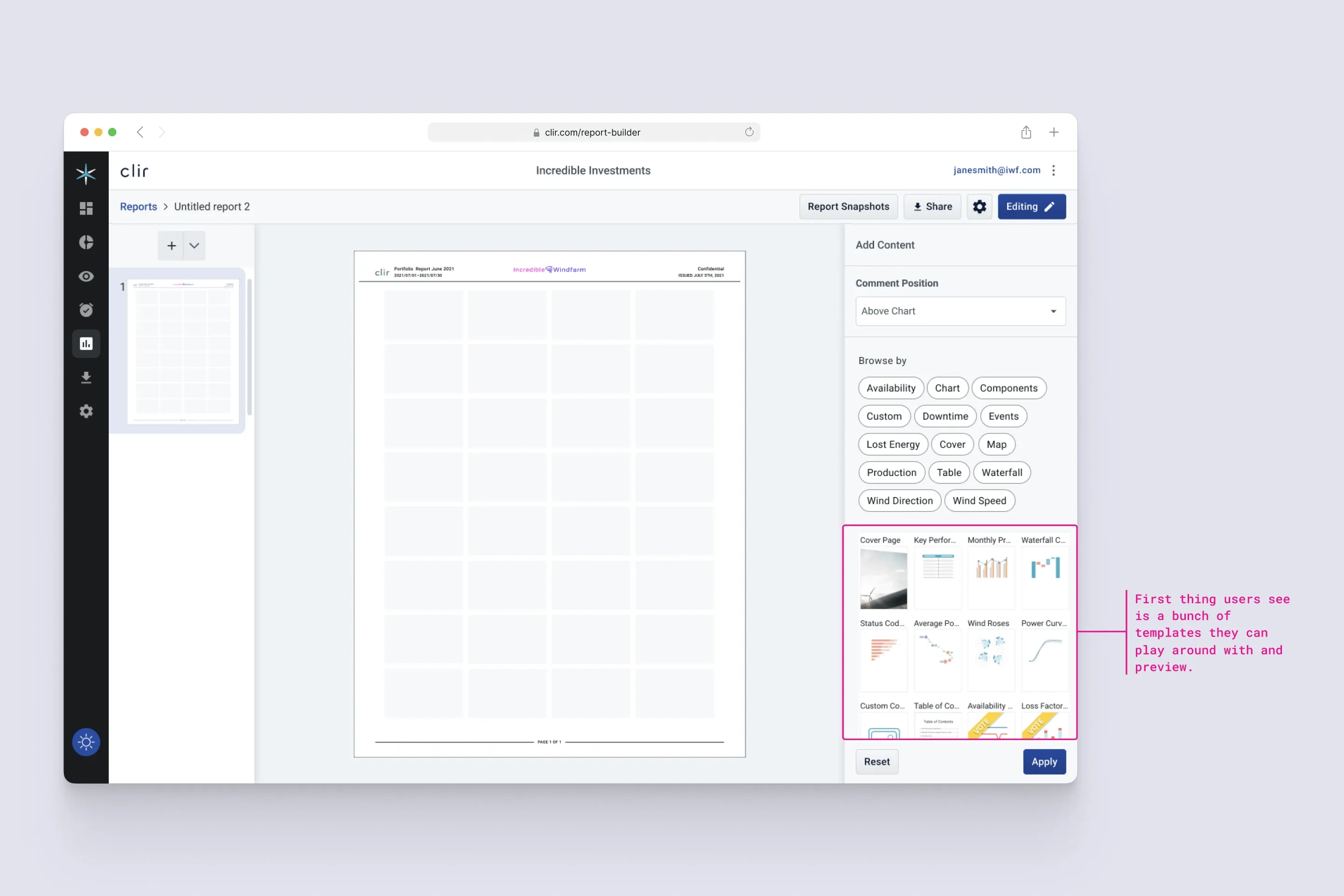
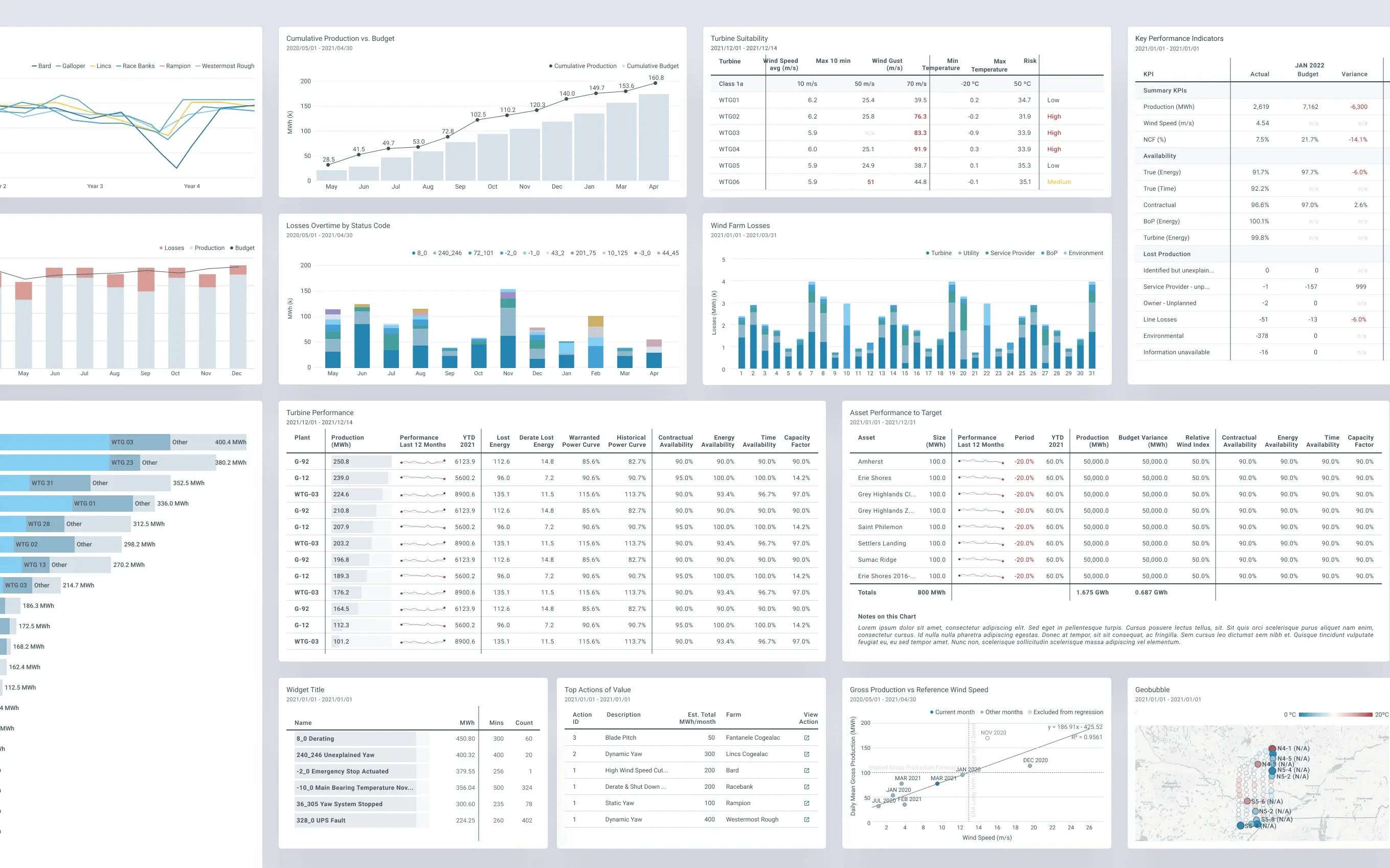
So I added report templates, including cover templates that arrive with default stock turbine imagery, and expanded the widget library well past what was there. You can filter the library by category and preview a widget before applying it, so you're choosing from pictures rather than from names.
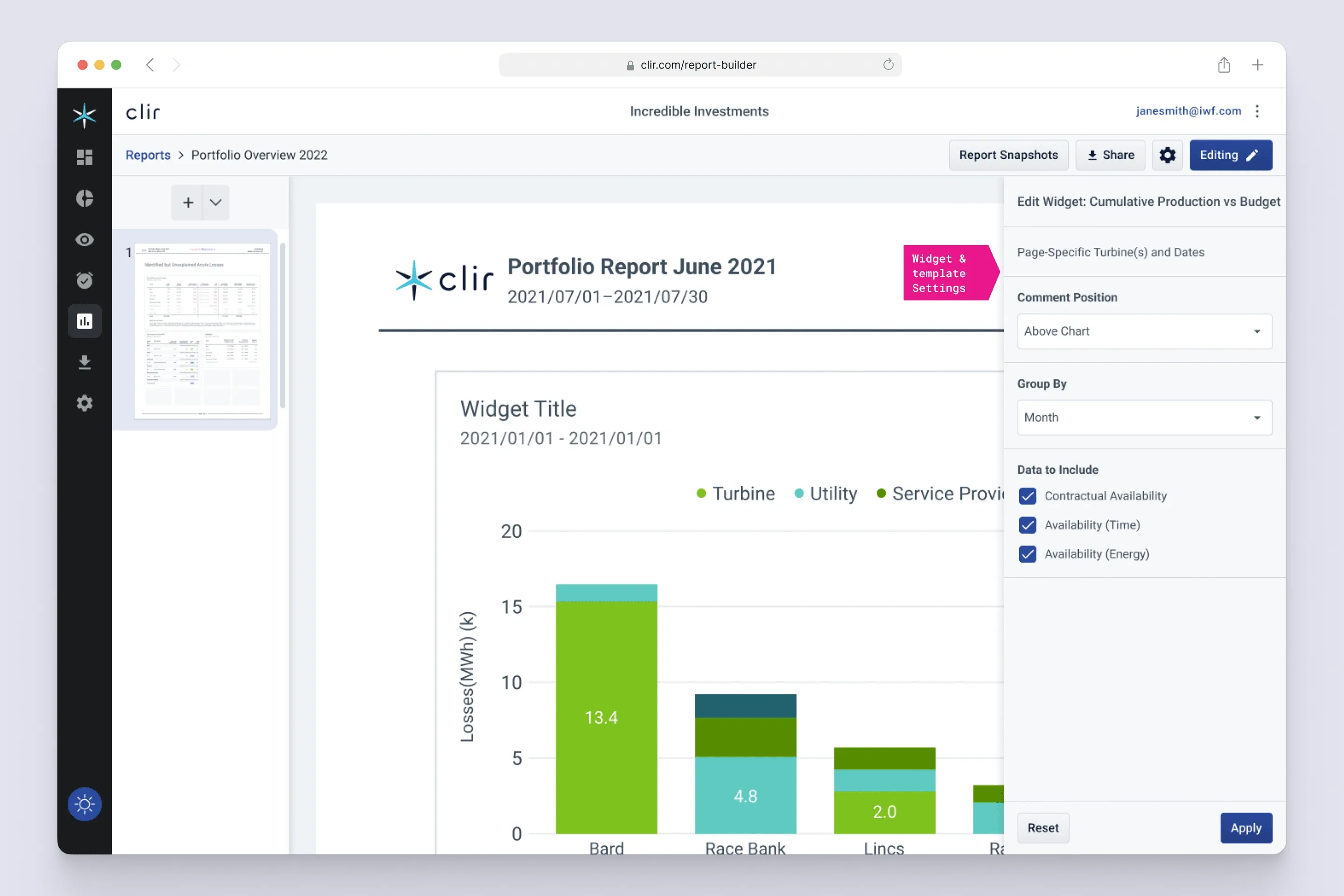
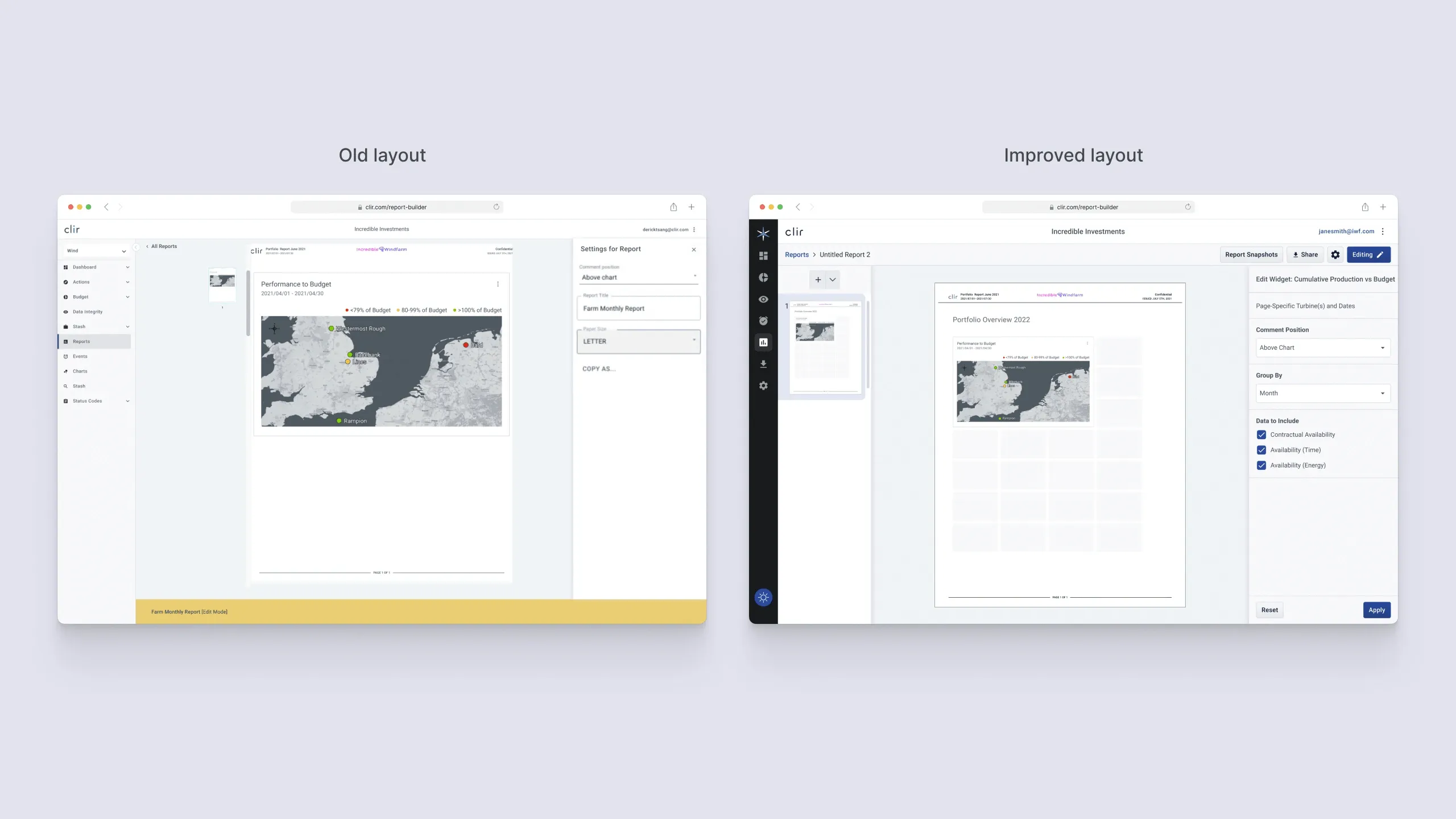
Once a widget is on the page, a settings panel handles the rest. You can move where its comment sits or change the grouping interval. For a chart, you pick which availability measures it includes.
A report has to print, so its grid is fixed
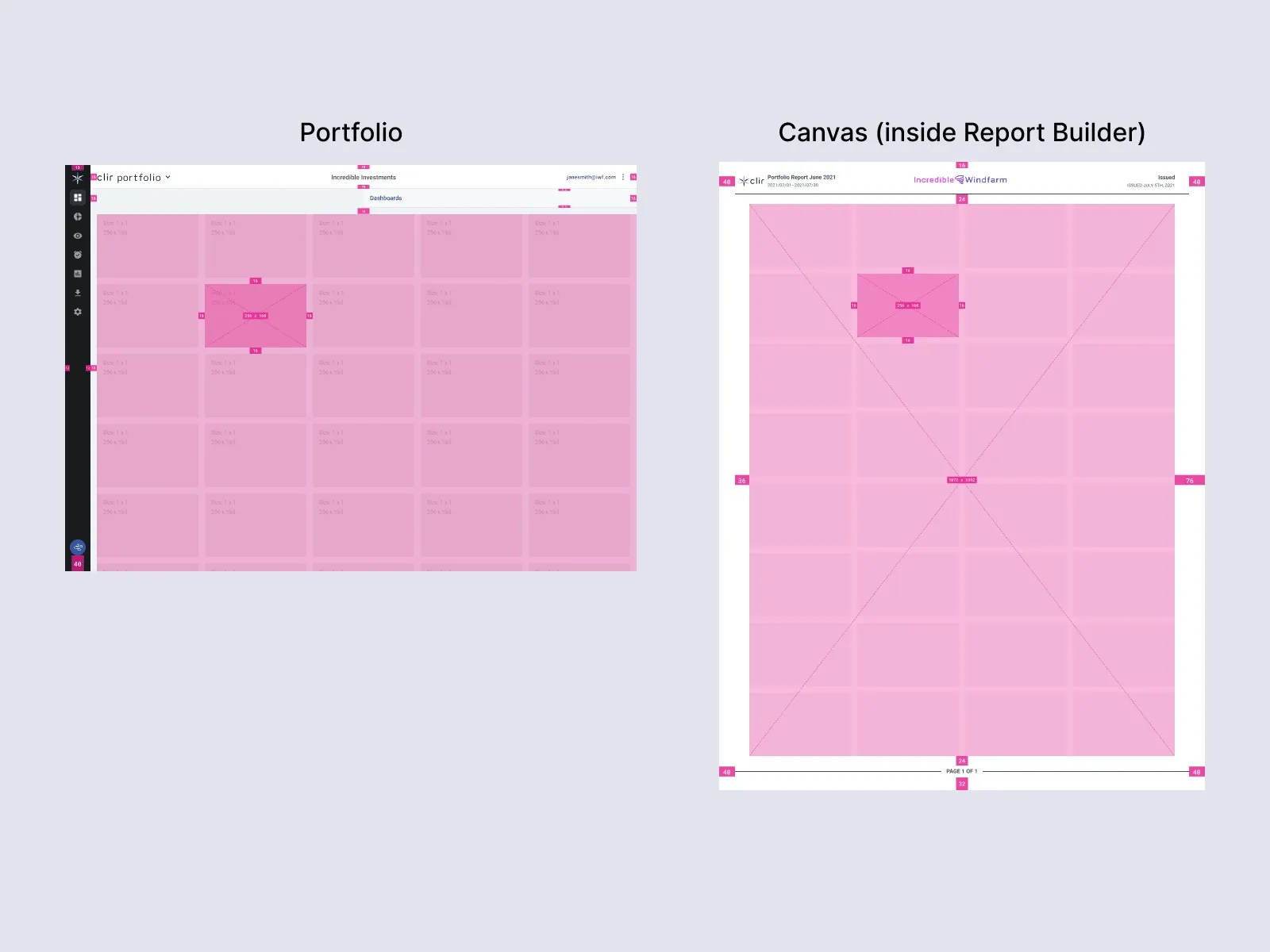
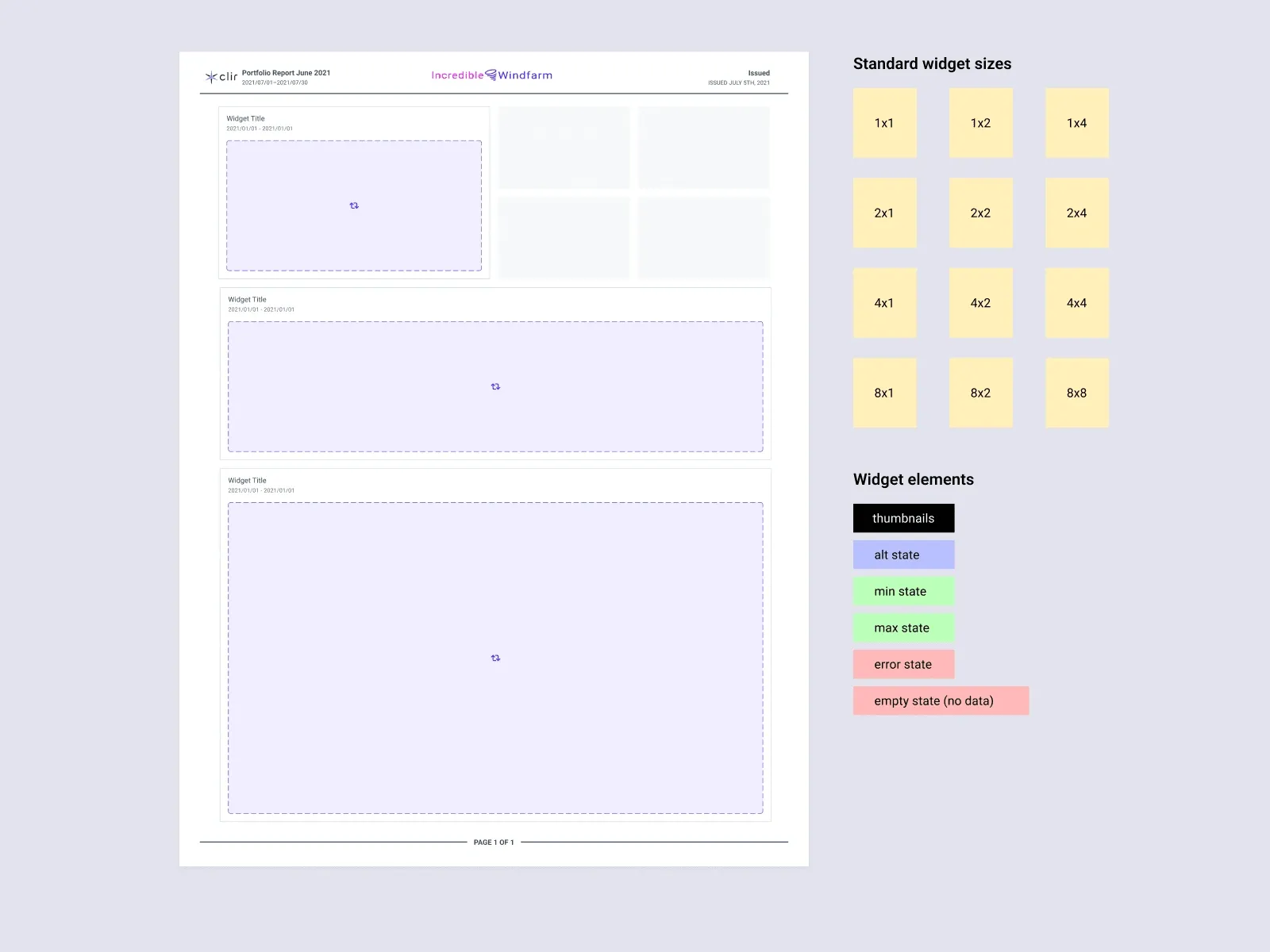
Underneath the widgets sat a grid, and it needed rebuilding. I defined what every widget carried: a type, a colour, a shape, and how it behaves when it expands. Standard sizes ran 1x1 to 8x8, with states defined for each.
This is where Brent's work and mine had to differ on purpose. The Dashboard uses a flexible column grid, because a dashboard reflows to whatever window it's in. The report canvas uses a fixed page grid, because a report is a page and somebody is going to print it. The widgets had to look identical in both places while sitting on two different grids.
Consolidating that visual language pulled in several other designers, since these widgets turned up on both sides of the product.
The controls needed grouping
The old interface couldn't manage what the canvas was holding. Controls had been added over the years and left where they landed, most of them in the sidebar, which absorbed everything.
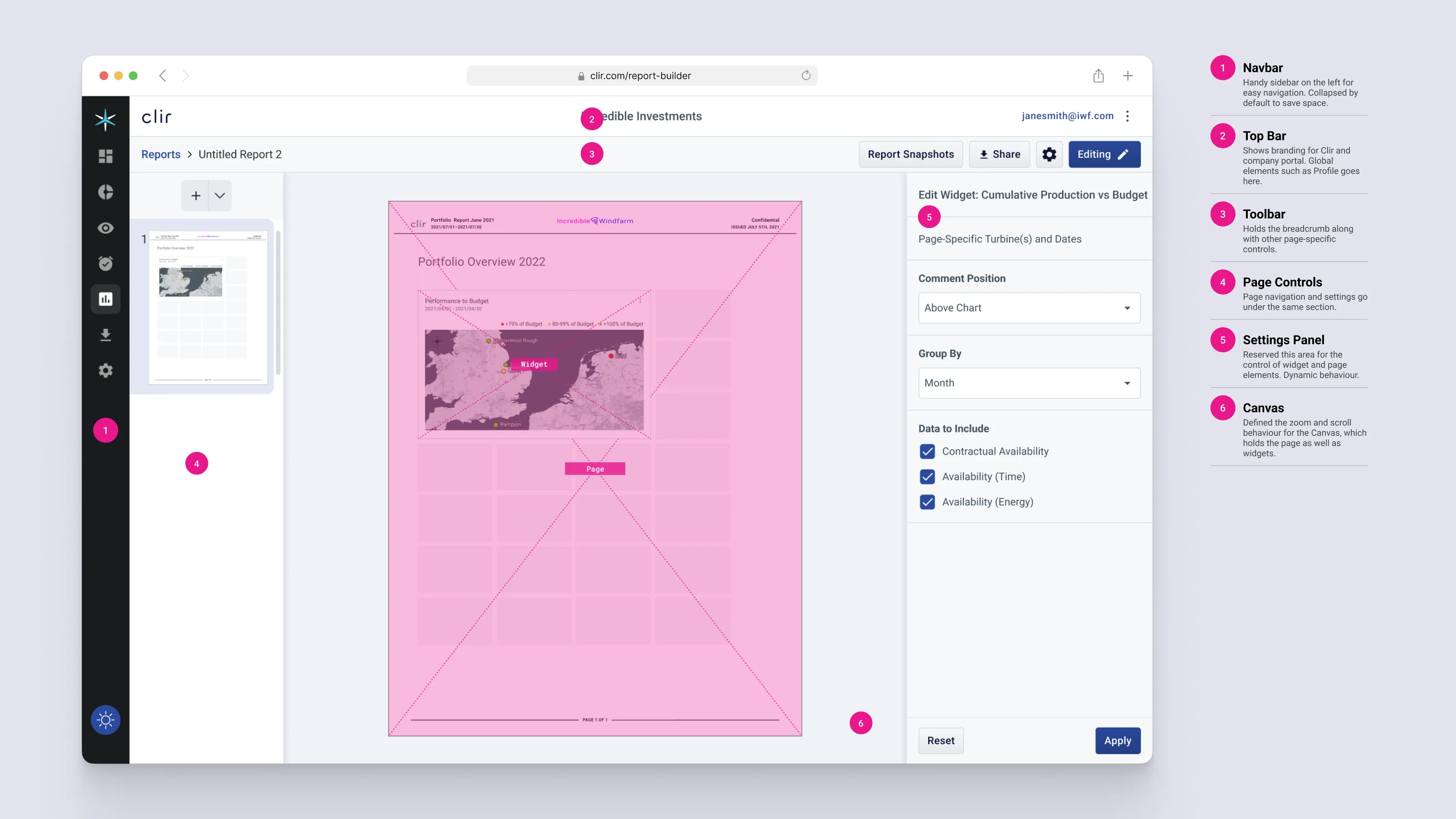
I sorted them into zones by what they act on. Navigation moves you between reports. Page control acts on the page, the canvas is the report itself, the toolbar acts on whatever is selected, and the settings panel holds properties. A collapsed navbar and a grouped toolbar replaced the crowded text sidebar. The final layout has six numbered regions: navbar, top bar, toolbar, page controls, settings panel and canvas.
It also gave the next person a rule. If you can't say which zone a new button belongs in, the zones are wrong.
Export and version history became two features
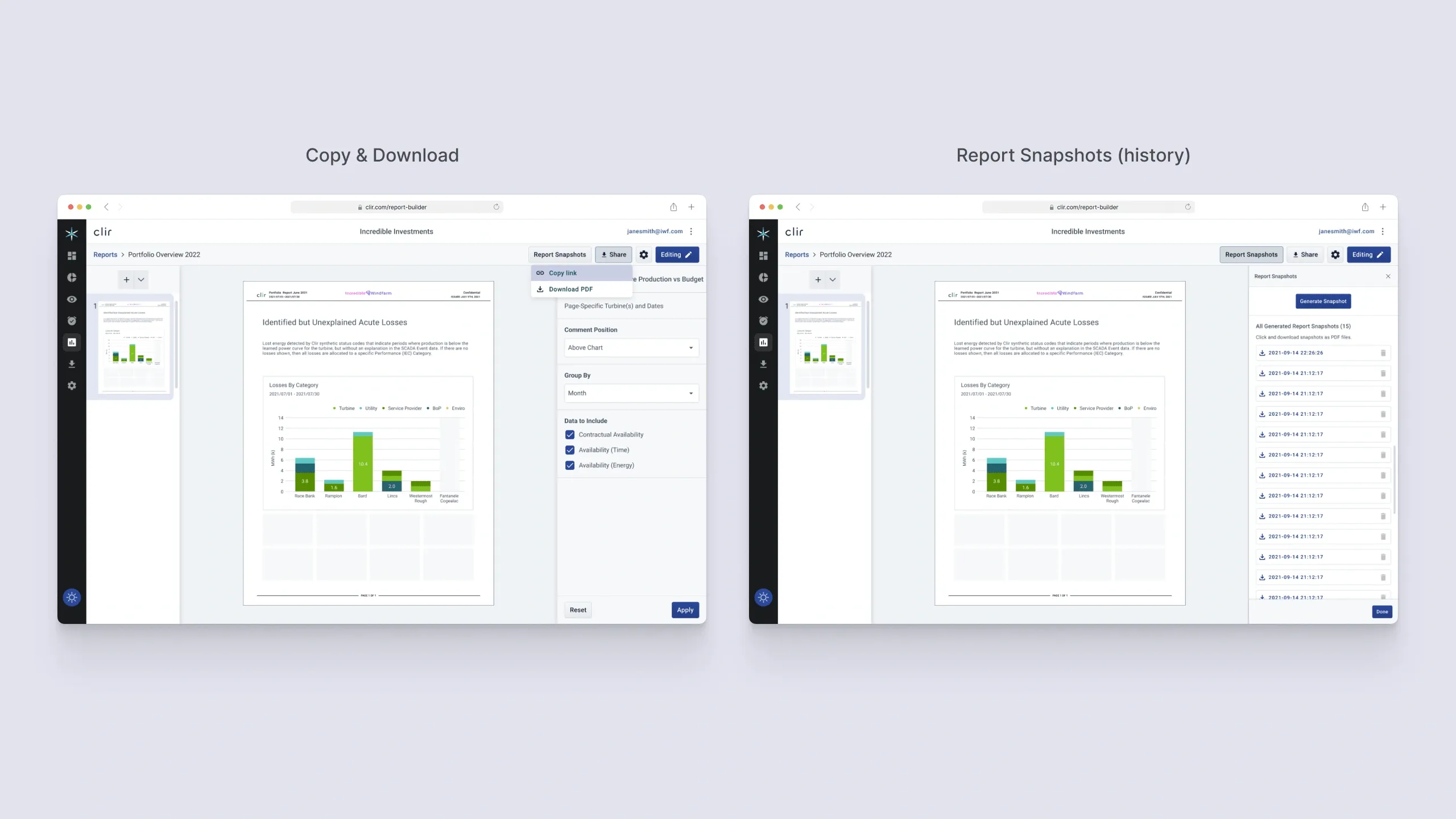
This is the payoff to the export finding. Snapshot had been doing two jobs. It sent a report to somebody, and it preserved a data state for later. Those two have nothing in common except that both produce a file, and building one feature for both is why both were awkward.
So I split them. Sharing came up to the top level, a Share button with Copy and Download under it, because sending a report is something people do constantly. Snapshot became what people had already been using it as. A Report Snapshots panel lists timestamped versions of a report, so you can open the state it was in on a given date without keeping a folder of PDFs to do that job for you.
The behaviour barely changed. The feature finally matched it.
Outcome
The design system came out of the work
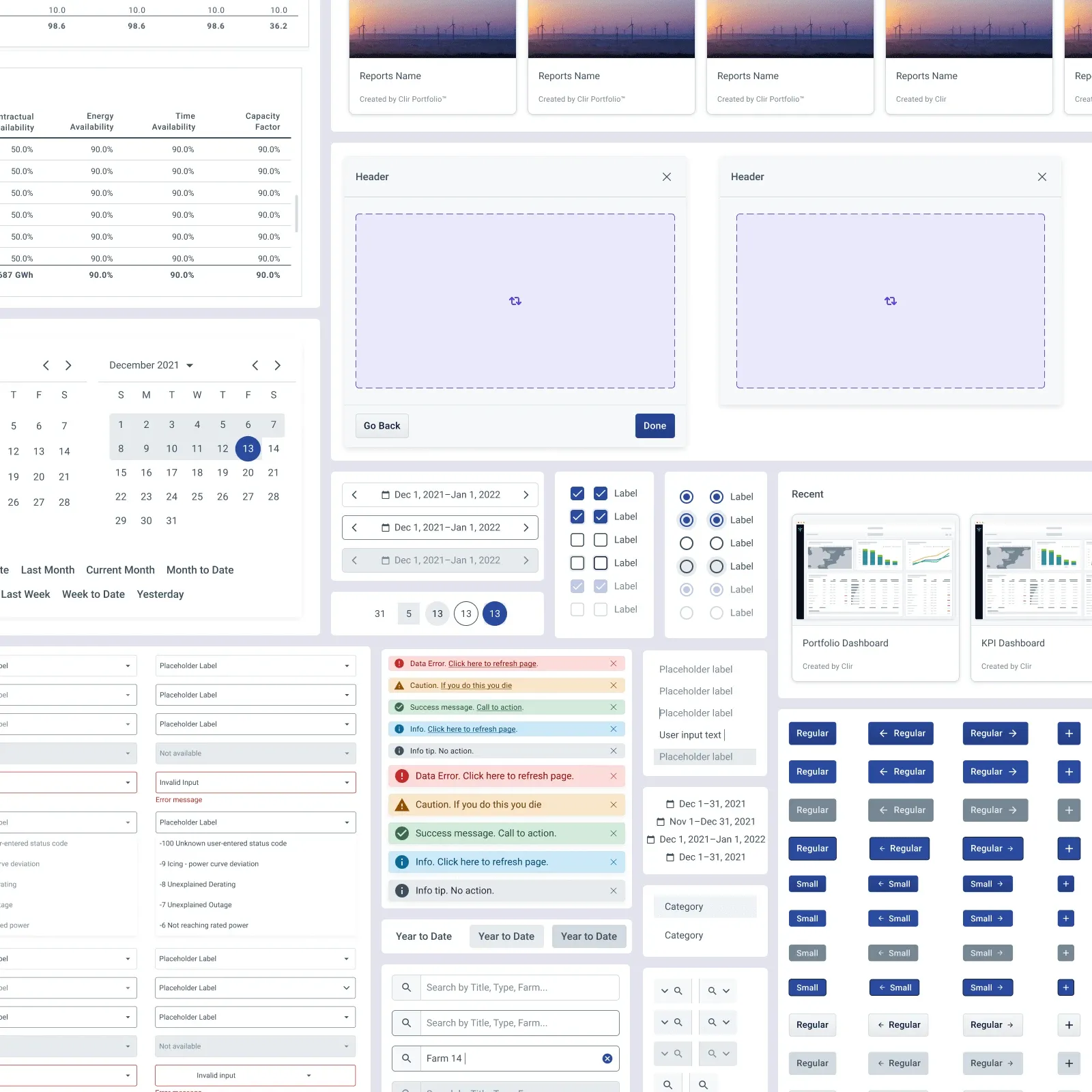
There was no design system at Clir when I started, which meant every screen I drew involved redrawing parts that already existed somewhere else in the product. By the end I had built out a set of Clir app components: data tables, date pickers, form fields, alert messages, checkbox and radio sets, buttons, and the report card thumbnails.
None of that was on the project plan. I built it because I kept making the same decision twice.
Moving between the Dashboard and the Report Builder
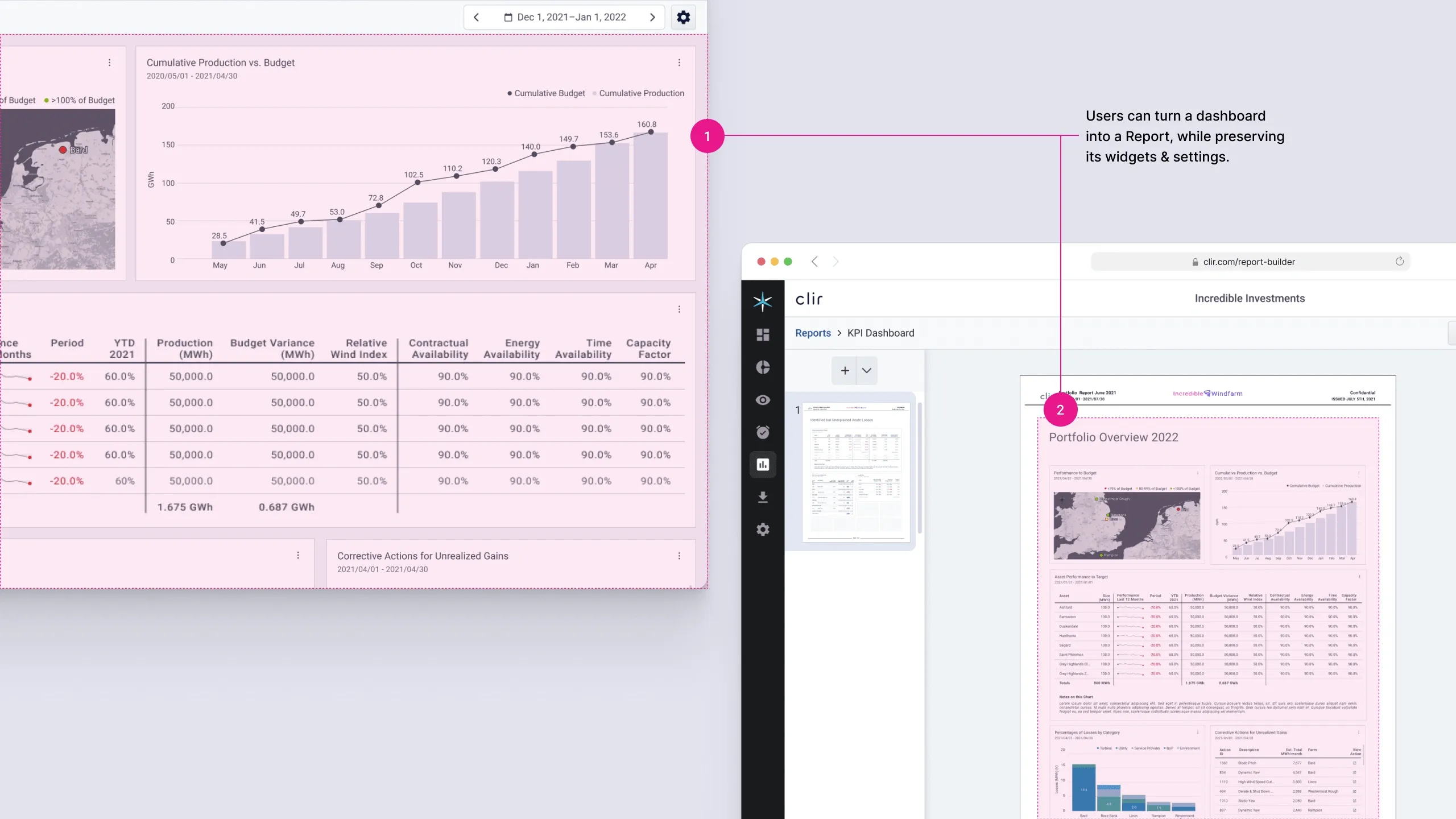
Someone who has arranged a dashboard the way they want has already done most of the work of a report. They've picked the widgets and set the filters. Making them rebuild all of it in a second tool is how you lose them.
So Brent and I coordinated the crossing in both directions. A dashboard can be turned into a report with its widgets and settings preserved. That's what the weekly syncs were for, since the two tools had to agree on enough structure for a layout to survive the trip.
The other half of it is familiarity. Landing on the Report Builder for the first time should feel like arriving somewhere you've already been. The widgets look the same and the settings panel behaves the same. The difference is that you're working on a page.
What internal testing caught
We ran a round of testing before hand-off with Clir people who hadn't seen the new UI. Mostly internal staff, and no customers in the room. Worth saying plainly, because internal people know the domain and will forgive things a customer never would.
It turned up no major usability issues. Over 90% of testers got through the tasks we set them. The tasks were exporting a report, saving a snapshot and modifying a widget. The complaints that came back were small, and the one that stuck was that report thumbnails still looked too alike to tell apart at a glance. We fixed that before launch.
What the round couldn't tell me was whether a customer would still be using the tool a few months in.
The numbers after launch
The help ticket number is the one I trust most. It's the closest thing we had to a direct measure of people being unable to find something.
- Help tickets down 37%. Fewer people needed to ask Clir how to do something the tool was supposed to let them do themselves.
- DAU/MAU ratio up 12%. People came back instead of building one report and disappearing.
- Feature adoption up 68%. The one that mattered most to me, given where it started.
- Clir Insights. The work laid the foundation for a new Clir product.
Reflection
What I'd change
The redesign moved the Report Builder a long way towards App 2.0. It didn't finish the job, and some of what it exposed was bigger than one project.
- A new design vision reaches further than you plan for. Concepts coming out of the Dashboard side, like disposable dashboards, ended up shaping the Report Builder and the crossings between the two tools. I couldn't design my half in isolation, and neither could Brent.
- The overhaul was permission to rebuild things properly. Moving to App 2.0 justified rebuilding areas like the widget library from scratch, free of constraints that only existed because of how the old version had been put together.
- The design system should have come first. Doing it the other way round meant redrawing assets across the whole redesign that a system would have absorbed once. It also meant I was making system-level decisions inside a feature project, which isn't where they belong.
- The back end set limits I couldn't design past. User group access and permissions constrained what the redesign could offer, and some of what I wanted to do with sharing wasn't available to me.
- PDF sharing is a legacy practice. The reports still went out as PDFs at the end of all this. The honest destination is live shared documents, the way Google Docs works, where the recipient sees the current state and the version history is built in. That would solve the problem behind the export finding at its source.